Showing posts with label technical. Show all posts

Thursday, April 29, 2010

PSP shell swap

As of this month, the Playstation Portable has been out for 5 years (in North America). I didn't get mine at launch, exactly but pretty early on. Yes, I got it with that really bad hockey game.

Anyway, 5 years later and my PSP has seen better days. The battery door isn't so tight anymore. There are cracks and scratches in the faceplate... So I did the most obvious thing to do to a device that has no warranty: I tried to mod it.

I thought, "how hard could changing a shell be?" Heh, right.
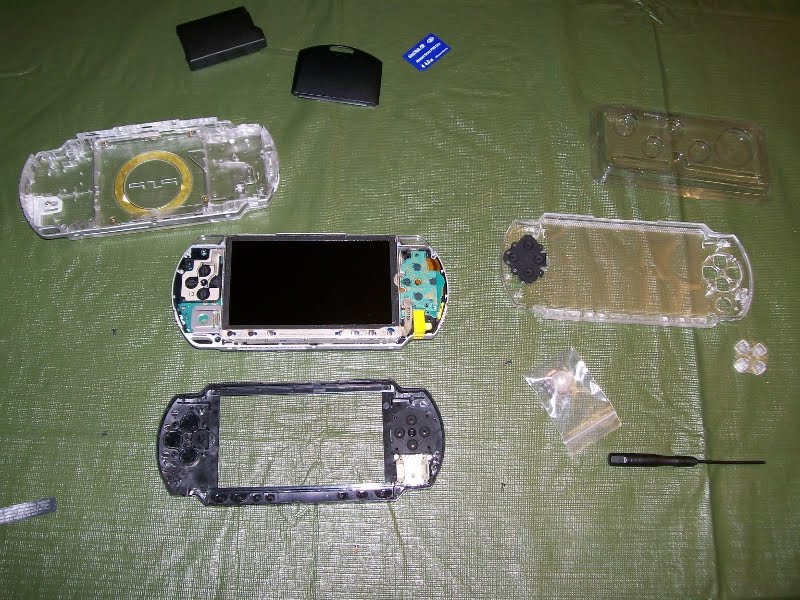
I started with the most obvious step: I turned over my PSP and removed all the screws I could see. The faceplate popped right off. I fitted the new clear stick, clear buttons, and clear D-pad onto their rubber mounts. Then... I examined the back.

And that's when I realized for the first time that while the front faceplate is a bit like the panel on the side of a PC, the PSP's back cover is like the chasis of a PC... this would take a little more time. Thankfully there are plenty of visual guides on Youtube on the disassembly of a PSP.
Before I knew it, I had the front button bar out, the LCD screen, the bracket, the wi-fi, power, sound card, and mobo out. To keep track of every piece and screw, I taped stuff to sheets of paper. The hardest part was changing out the UMD drive... popping the door in and out was a scary affair because despite pulling apart everything, I still didn't want to actually break anything.

Reassembling was easy except for the fact that the new plastic shell doesn't quite exactly line up like the original Sony one. I had to Dremel a bit to get screws to fit.Here's the semi-finished PSP in the new shell. Surprisingly, much of it works - I'm pleased to announce I didn't seriously break any of the circuitry. Unfortunately that's not to say it's perfect.

First, the controls are not as responsive as before... I feel like I need to press the D-pad and the front buttons harder. And the power switch is finicky - sometimes not wanting to turn on or off. But the number one problem I still need to debug: the analog stick is sticking! At first I thought it was the new stick being defective. But after removing the shell and holding the stick down in place, it seems to work fine. Not really sure what else to do...

Thursday, February 26, 2009

Go to the right Marketplace!

OK, so it's been like a week. I've posted this info on a couple of different forums already but every day I still see new posts everywhere from people asking why their codes are "expired!"

The deal is this: certain retailers gave you promotional codes when you buy Dawn of War 2 (no, you didn't miss anything, I didn't blog the retail release). Anyhow, for the uninitiated, the game is networked via Games for Windows Live. And if you use Windows Live Messenger (or MSN Messenger for those who aren't calling it by its official name), then basically you're already a member anyway.

To get set up you do need to choose a Gamertag - which also happens to serve as an Xbox Live Gamertag. You can tell because when you play around with GFWL pop-up, it'll also invoke your web browser for account management... but the site you get to looks suspiciously like an Xbox site. But other than fooling around with your Gamertag stuff, it's pretty much unrelated to GFWL. Confused enough? Don't worry, what you need to know is: do not enter your PC game's promo code at the Xbox Live Marketplace.

What you DO need is to go to GFWL and get the stand-alone client. Once you install and run the client, then you can click the "Marketplace" tab and there you will be able to enter any promotional codes that come with Games for Windows products.

Tuesday, October 28, 2008

Media Manager is free? Or not?

Did anybody else get this email from Playstation Underground? The big banner proclaims that there is now a version of PSP Media Manager that is free to download. But when I click on the link, I get a 404 error. What the hell? It's as though somebody at Sony (or SCEA anyway) suddenly came to their senses and thought, "wait, why are we giving away a product we've been trying to sell for $30 for the last 3 years?"

Indeed, if you search around the Playstation Network site a bit, you'll find a "beta" version of PSPMM that is marked free (but follows the same dead link), and right below you see a "PSPMM Pro" that actually displays the retail cover art for the PSPMM we've all seen but were too smart to pay for anyway. And let's face it... only smart people read my blog, yes?

I've ...*ahem*... previously demo'ed Media Manager. And to be honest, I didn't really like it all that much. It was a little bit too... shall we say... Mac-like. I'm the kind of person who likes to know where his files are physically located. And on top of which, by the time PSPMM came out, I'd already been using a freeware alternative I was very happy with.

Monday, August 25, 2008

waking up from sleep mode

OK, so I got a puzzle for my readers and I just spent at least 90 minutes crawling the back-alleys of the web reading a million different sleep-mode problems in Vista and each one different from the last... and none of them the same as mine.

Actually, not accurate. I did find one person who does have the same problem - but nobody replied with a working solution.

Anyway, so folding down my laptop puts Vista to sleep mode. But on waking it up, Windows Live Messenger (currently v8.5) hangs. The icon appears in the system tray, but cannot be clicked (left or right). I need to use Task Manager to End Task and then restart it manually.

Anybody else see this before? Got a solution to share with me? Post a comment!!

Sunday, August 24, 2008

Star Wars poster guy

I was at mrbabou's house last week showing off my laptop. So new, I hardly knew what the heck I was doing. But not new enough that I had already gotten it to look the way I wanted, with a sweet Star Wars saga wallpaper on the desktop - surely a requisite of any computer aficionado. Of course, like anybody else of our generation, he proclaimed his love for my sweet Star Wars saga wallpaper.

Anyway, so it got me thinking... where did I find this to begin with?? I'm not going to post it AGAIN, (because it seems to be have been stolen like a gazillion times). But I will post the result of my click-finger-numbing efforts. I finally traced down the source of the famous Star Wars Saga wallpaper.

I present to you, SimonZ's web site:
Just go into the posters section and dig around for a few versions of his original imaging work. The guy is genius, scouring the web for the best of Star Wars imagery in hi-res and then fading and pasting everything together. Check it out today!!

Thursday, August 21, 2008

ad-hoc shelf customizing

I walk into the local shop hell-bent on getting their Nagato Yuki in white bunny suit. They were packing up for this weekend's FanExpo in Toronto so I wasn't even sure if had been packed up. Lucky for me, they had more than one - one that wasn't packed and was actually still MISB.Something unfortunate about adding Yuki to my display is that she's just a little bit to tall. Tsuruya-san fits because she's stooped over. But Yuki is the only one in the set (including future releases) that stands up straight. She doesn't really need it, but she does have a safety clip on a metal post that holds her at her left thigh... just in case of any tilting accidents.

My solution for the height problem... a set of fruit cups (eaten, of course). They just tall enough and stable enough for the next shelf above to rest in place. What say you?

Sunday, April 06, 2008

The PSU story (still)

Well, the story, hopefully has a happy ending (even if it took forever to conclude). My folks visited me this weekend. If you hadn't figured that out from my previous posts, then at least you have noticed some unusual activity in my Twitters. They brought along the failed Corsair.

Previously I had gone back to the shop and asked about changed out the PSU. The guy said he'd waive the 30-day limit for me and told me that since I'd been reporting ongoing troubles ever since the original purchase that he'd deal with Corsair himself and that I'd get a store credit to pick another PSU.

I chose an Enermax. I know, they're not fancy by any means, but they're reliable and I trust them (I've had one for nearly a decade now). So now I've got the new unit inside my machine.

It seems to be working okay. I'll give it a couple of weeks because well, you simply never know. Heck, it was at least 6 days after my install of the Corsair in my parents machine before it up and died on them. I mean, what the hell? Still haven't applied the case sticker yet (nor for that matter have I removed the Corsair sticker). I think I'll keep it as a reminder that from time to time, even the most reputable guys can make a lemon.

Tuesday, March 25, 2008

The Final Word on the 450VX

(As far as I'm concerned anyway!)

Well, I'm back from visiting my parents. I went with two PSUs in my baggage. My old Enermax (which really had nothing wrong with it to begin with except its age) and the troublesome Corsair I had blogged about previously. I was armed with only a medium Phillips screwdriver...

Well, when I got home, I pulled out the temp PSU I had thrown in a month ago when their original PSU blew up in a spectacular puff of black smoke. Then I mounted the Corsair into the case using a gentle bit of elbow grease (it seemed to be about a fraction of a millimetre too big - I think it was the larger fan-grill on the bottom of the VX series). Anyway, it went in and plugged in just barely. The 20-24-pin combo plug was a tight fit for their particular motherboard. And then... [insert drum roll], the machine booted up.

And it continued to boot up. In fact, it booted normally throughout the rest of the 4-day Easter weekend. So, reluctantly, I decided to let my folks keep the sexy new PSU. So now everything in my own home is back to status quo (The old Enermax is back in my machine), and $80 has gone into my parents' POS machine.

Monday, March 10, 2008

The PSU chronicle

Well, I still don't know what the hell is going on.

I took my new PSU into the shop to show them what was up. But when they plugged it into their test gear, the multimeter showed normal readings across the board. In fact, compared to my readings, some of the voltages I said were high were a little low, while those I said were low were a little high.

Anyway, they suggested I retest my PC with the old PSU plugged in, and then retest the PSU myself by plugging in only 1 device at a time to see if there was something drawing an unusual amount of juice that would cause my low readings.

So home I went. First I plugged in my old PSU into the mobo and video card alone - no hard drive. The system posted fine and the BIOS readings looked very normal. Then in went the new Corsair PSU (the same setup). The readings were still low. But I did make note of the fact that the power button was now acting normal again and starting the power supply on the first button press.

So I shut it down and added the hard-disk and floppy, all on the same cable. This also posted fine and the voltages were still low. But again, the ATX wake-up button seemed to be delivering enough power. So then I shut it down and plugged in the second IDE line for my optical drives (these on a second line). Also booted okay.

I dreaded the next step (because I had troubles with the case accessories before). But I shut down a final time and plugged in the case fans and front-pannel (on the line with the optical drives). And surprise! Everything was up and running and no sign of the strange ATX power button weirdness I reported earlier. It seems like the low voltage was NOT the cause of the false-start because I'm still reading between 4.70 and 4.73 volts on the 5V line.

I refer you to the old fallback: "why ask why?"

Tuesday, March 04, 2008

updates all around

The running commentary on my PSU: I've learned that I'm not the only one with "false starts" on my PC. According to http://www.pjrc.com/about/rambling/antec.html my ATX power switch is a symptom of a weak 5V line. I can't wait to check out the readings in my BIOS. If I can confirm it's the same problem, I'm taking the thing to the shop to show them and then ask for a replacement.

Also, about a month ago I reported seeing cracks in my paintball loader. Well, DXS never got back to me. I even called this support line and left and message. Anyway, in the end (last week) I tried what I swore I wouldn't do: contact the store that sold me the loader. These guys in the past would take an eternity to respond to me but this time sounds like they got my back. They gave me an RMA number and said depending on what the thing looks like, they'll send me a new loader. They also thought to warn me in advance that they only had black ones left in stock (I'm at the point where I don't really care). Anyway, I shipped it off yesterday. We'll see what I get back...

My last Amazon order is still in limbo. I wrote about this in January, I think. The Annihilation book is in but the Voltron book is not. Argh. Good thing Weirdguy still invites me to the comics shop every week (he goes for the designer collectibles while I go for weekly randomness).

Speaking of which, here's a shout-out to a new player in the virtual world: www.canadianvinyl.ca - they're so new I was member number 2... I'm pretty much Weirdguy's test monkey. But he did open a section on the forums for discussion of anime PVC statues. The only collectible vinyl I own is a PandaZ Robonimal. I should blog that in the near future...

Monday, March 03, 2008

ATX weirdness

In the 24 hours following my install of the Corsair VX450W PSU into my box (with an Asus A7N8X-E motherboard), I've discovered something ...weird.

From a "cold" start, I must press the ATX power switch twice. The first press doesn't do anything. But a second press will boot up the PC. Once up and running, it exhibits no symptoms of unstable power or anything.

And instead of holding-for-a-second to shut down, simply pressing and releasing the ATX power button will cause the PC to power down (including proper shut-down of the OS and everything!). In fact, it behaves exactly like it should if I had pressed-and-held-for-a-second.

Now the weirdness of shutting down doesn't bother me much. Because I can't even remember when the last time was I had to use the physical ATX switch to shut down my PC. I always use the OS software shut-down. But it does bother me that I must hit the switch twice to turn on. I can't help the feeling "if it's not working properly, that might be a symptom of something else wrong."

Update: a couple of hours later while browsing my motherboard manual, I've learned that the power-down delay is a programmed behaviour of ATX. For some reason, my board's default CMOS setting is for "instant-off" when you hit the power switch while the PC is on. After playing in the BIOS, I was able to set the delay on - tested and working. Just proves what I said about not using that function too often, eh? "not often" as in "never."

Sunday, March 02, 2008

The Corsair PSU

I needed to have a spare anyway. A few weeks ago, the PSU in my parents' computer fried (I'm serious: a loud pop and a puff of smoke came out the back!)... So I figured, I have a decent PSU in my machine... but it'd be cool to have a new one (it's always cool to have new stuff).

This hunt started back in the fall when Ars Technica did a highly unusual hardware round-up: they reviewed a whole bunch of Power Supply Units. While the Seasonic S12-II came out on top, Corsair's offering was in the running too. And in fact, it picked up a ranking at SilentPCreview as well. I picked up the VX today at a local shop. Now I've never purchased my own PSU before... but I figured, I've built PCs before... all PSU follow the same basic principles, yes?

After being fairly experienced with trying to save a few bucks buying OEM products, I was pleased to know that in a retail box, even PSU manufacturers like to spice up their goods. The box opened to reveal a cloth draw-string bag with the Corsair logo silk-screened on it holding the PSU. Too bad it's a little ragged like it's been snagged on something before. Oh well. The PSU also came with a bunch of plastic-ties and a case badge (yeah! another one for my collection).

I was a little confused at first because the main plug was 24-pin and while I didn't panic, it took me a moment to realize that the 4 extra pins just snapped open to swing away from the rest. Presto: a 20-pin plug. Another thing that threw me off was that on my old PSU, it had a separate line to the motherboard that could monitor the fan. Well, the VX doesn't have one. And finally, I also worried a bit to realize how old my platform is getting. I don't own a SATA drive... so pretty much half the plugs are useless to me. And would there be enough 4-pin Molex plugs for my IDE drives and video card? Hmm...
Well... yes.
The VX completely maxed out in my case to power a pair of optical drives, my HDD, video card, case fans, lights and front panel. I breathed a sigh of relief at the end of that install. All the unused lines were tied up and tucked into an unused drive bay. One last thing that drives me a little crazy: my PC is just as loud as it was before this PSU went in. Turns out my old PSU was an Enermax - while not the most silent PSU in the world, it did boast the "whisper" label on it. And of course, my two case fans are probably making most of the noise, however, I'm not too keen on removing those.

Wednesday, January 02, 2008

Fixing the damn HID

In their trademark outstanding attention to detail, Microshaft had seen fit to have an infinite number of variations on your typical Windows install. For my part, I use a version of XP Pro with SP2 and guess what? Although this is the very same version that my parents have, while their HID service started without problems, my service did not.

HID stands for Human Interface Device and is basically Windows' way of recognizing industry standard signals coming from a given keyboard. Have one of those fancy keyboards with media keys like volume up/down, play, stop, etc? That's an HID. And HID Service is what "makes it go."

So on day 2 of running on my G15, I decided it was time to stop goofing off with my macros and start playing with the media keys (which weren't working yesterday). Turns out my HID Service was not running. I found clues on-line what the problem was (not missing files but actually a registry problem. That is, in order for HIDSERV to work, the service keys under your HKey Local Machine registry should look like this:I was missing an entire key under HIDServ. Now for those of you who aren't really into mucking around the registry, it may look like Explorer, but it doesn't quite navigate the same way. Each "directory" is actually a key itself. And mine was missing "Parameters" key under the "HIDServ" key. So you need to right-click in that window and say "new" and "key." In there, you need to create a new "expandable string value" with what you see in my screen capture.

I'm basically repeating info I found on the web but I think a picture is worth a thousand words. Because reading other peoples description of the registry, I had no idea I had to create my "ServiceDll" value inside another "subfolder" I was missing!

Anyway, being that DJ Specs asked so nice, here's a shot of what my work area looks like at the moment. I only now realize after having photographed it, what a frickin' eyesore this mess is! :P

Tuesday, January 01, 2008

First Impressions: G15

So yeah, I'm enjoying a week-late X'Mas present to myself. I picked up a G15 (version 1 - the blue one) on December 24... needless to say, besides just plugging it into my parents computer to make sure all the keys worked, I didn't actually get to put it through its paces until now

So my first impressions after fooling around with it for about an hour or so?
Well, first of all, it's a pretty solid keyboard. And you can't really deny the inherent coolness of having a "gaming keyboard." I mean, forget the plain keyboard you "just get by with" this is a keyboard made for playing with, for crying out loud.

My second immediate thought was, "damn it, this thing is pretty big." I mean I'm used to having my keyboard on my lap (depending on the chair I'm in, of course) but at that LAN party last month, people looked at me funny when I told them I wouldn't need as much table space as everyone else. It's that additional keypad of macros keys on the left that gives it width. It also takes a moment to acclimate to the shape. I'm on those folks who rarely looks down at his keyboard, so I operate by touch, mostly. But now ALT+Tab and the ESC key down feel like their in the same place anymore. They're no longer at the left-most edge: the programmable macro keys are!

And what of that fancy LCD screen now that I've had some minor experience with it? Well, it's cute, but I don't see myself using it that much. I do feel ambitious and I think I will try the included SDK. I've already downloaded the Unreal Tournament patch that puts a running ammo count on the LCD. That's again, something cute, but why the hell would I take my eyes off the screen to look down at my keyboard?

And while Logitech has added a Dawn of War to the profiler software, Relic still hasn't patched it with any usefulness with the G15. That is, the G15's macro key profile manager is smart enough to recognize that have Dawn of War installed and will let me reserve a keyset for it. But I was really hoping for the LCD panel to, I dunno, tell me how many critical points were being captured or something.

So, uh, yeah... anybody want to do that?

Saturday, December 15, 2007

Monster PC700

Blurring the thin line between geek-ness and nerd-dom, I bought a Monster PC700 power bar today. Not because my POS computer requires such lavish hyperbolic protection... But rather for reasons simpler than that: the price was right.

Simply put, I found it on the shelf at The Source (aka: Circuit City) at a ridiculous half-price. Yes, twenty-five bucks IS HALF-PRICE. If you're not in the know, that's because aside from setting the industry standard for mid-range home-theatre cabling, Monster is also dabbles in over-priced solutions for power protection. They have a whole line of this sort of stuff. Just walk into your local Futurecrap store and you'll find a really gimmicky demo station with what looks like an oscilloscope read-out that shows the stability of the electric current with and without a Monster product in it...

But aside from the questionable legitimacy of Monster's claims or the rationale a sales guy will try to give you for paying out the nose for a freaking power-bar, I will give Monster credit for some of their design choices. Besides making good solid cables, they do produce a pretty cool power-bar.

For their power bars, the plug is a handy round affair that is angled so it won't interfere with other plug you may want to have in the same 2-outlet wall-jack. The main toggle is positioned safely on top where an errant toe won't kick it accidentally (if you happen to be me at a certain LAN party). Plus, on the off chance you have a few plugs for devices which have their transformers built into the plugs making them fat, Monster also provides a few outlets with extra space around them too. Do you have one of those all-in-one FAX printers? Well, that's now protected too as there's a pass-thru for the phone line on this baby as well.

Monster products don't go on sale too often. In fact, they pretty much NEVER go on sale directly from Monster and usually it's the retailer taking a hit (I've been told in the past that Monster has very strict pricing policies on their products). So if you're in need of a power-bar to replace that crappy one you bought in the 80's, welcome to the 21th century.

Sunday, December 09, 2007

Game Night December 2007

This is a 2-for-1 post. First, last night we (my buddies and I) held a LAN party - and considering the nature of PC gaming (installing games, version compatibility, hardware setups), I'm amazed we had as few troubles as we did. Of course, it helped that we tried to stick with a game we all knew we could run: Unreal Tournament 2004... old enough that I acutally found a used copy at a local Value Village (aka: "Savers" in the USA).

Hi-lists and lo-lites:
- While figuring out how to plug in the various PCs that everyone bought, I accidentally kicked a power bar's toggle switch, killing the juice to both my PC and to Weirdguy's PC. We don't know if it's related, but for some reason we couldn't get his machine to stabilize afterwards - it would reboot itself for no apparent reason from time to time. And then after a while, it went back to normal.

- Once all 8 players were in place and all the PC's plugged in, the power went out. We didn't throw the main breaker because the hall light could be turned on. Heh.

- Only 1 out of 8 PC would refuse to connect to the others. We spent all night taking turns at the problematic machine trying to debug it while the other 7 would play. We never did figure it out.

- Took a break for a pizza supper. As anyone can guess, there was bound to be a round butting heads over toppings. I drank two cans of "energy drink" during the party... one Tab Energie and one Sobe Arush. I wouldn't fall asleep until about 4:30am!

- broke out the old SNES to play Super Bomber Man 2 by 2AM. It was also awesome. I complained that the game wasn't particularly realistic.

Now for PART 2...
I was just reading in Running Room Magazine an article about caffeine. For the longest time I've been wondering just how "extreme" are these so-called energy drinks. Well, Toronto nutritionist Tara Postnikoff reports that Health Canada recommend no more than 400mg of caffeine daily for an adult. And that an 8oz cup of coffee has about 150mg... so... wait, that would mean a typical 250ml can of Red Bull with 80mg of caffeine is about half a cup of coffee. Of course, that doesn't take into account all the sugars and other stimulants in an energy drink.

Anyway, beyond this, I've also decided that Tab Energie sucks. I mean, it does what it's advertised to do but it also tastes terrible, if you ask me. Firstly, I hate diet drinks - artificial sweeteners have this chemical aftertaste that remind me of cough syrup. Well, Tab Energie suffers on two counts:

First, it has a really really strong "diet" taste. And secondly, it's a cherry flavour drink. Whereas Red Bull and Arush taste more like cherry cola, Tab actually tastes like a cherry drink - like those Crush or Minute Maid fruit-flavour soft-drinks. But of course, a being a chemical-tasting cherry drink, it tastes more like bad coough syrup. I'll take an Arush over this any day.

To close up, however, can somebody out there tell me if this is the same "Tab" drink Americans have and we don't?

Monday, September 17, 2007

Messenger roll-out screws me!!

Messenger is arguably the most polished of the IM clients out there. I tried a few others in my day but nothing is more intuitive than Live Messenger (formerly MSN Messenger). It keeps me in touch with friends and family (particularly my mother who likes to go on-line early in the morning and sometimes we video-chat; and it's all free - unbeatable!).

Well, if you haven't heard about it yet, this past week Microsoft decided it was time to roll out version 8.1 - but in the process crushed any sense of normality I had come to expect with Messenger. Somehow, the network refresh completely wiped me out!

Now there's an up-side to this... For the last 11 months I've been using an outdated email address to sign-in to Messenger. An email address acts as one's LiveID. You can change your email in your LiveID profile, but you cannot change the actual LiveID itself. This morning for whatever reason (I guess somebody else claimed my old Sympatico address finally) LiveID prompted me to update my username. So I gave it my new Rogers email address. Easy right?

Wrong.

Firstly, I've since discovered that I lost all my custom emoticons, custom avatars, and backgrounds for chat-windows (which was a very ero-kawaii Misaki Kureha from Divergence Eve, by the way).

Secondly, I don't know if this is new or what... but just now a buddy helped me test my setup. And boy did it act funny. Let's say we're in already in a chat window and I decide to hide by going "Appear Offline." Suddenly my friend could not continue our conversation... any further messages he typed into our chat window instead went to some kind of temporary hotmail inbox (and I assure you, I don't have a hotmail address). Talk about bizzarre!

Anyway, excuse me while I go try to rebuild all my missing emoticons and stuff.

Thursday, August 30, 2007

WinXP: is it a known bug?

I'm just throwing this out there... maybe someone will read this and it will ring a bell with them. But I for one have never encountered as many problems as my parents have on my own system.

My folks are running WinXP (of questionable origins that neither myself nor WGA will attest to *ahem*). And they are pretty computer illiterate so I can only assume that from time to time they will allow the auto-update to function.

All I know is that at one point, after grabbing a bunch of updates and attempting to reboot, I got a "Windows cannot boot because the following file is missing" (and I'm just paraphrasing because it was at least a few months ago)... and IIRC, the file in question was some DLL or something (a config.-something). Well, anyway, it prompted me at the time to foolishly run out and buy them a new harddrive and in the process accidentally destroying any backups they had of... well, everything... I won't get into that now.

So anyway, the last time I debugged it I got it down as far as a bad PSU (which thanks to a co-worker buddy who had an old derelict lying around, I got to replace for free). And then the following morning I narrowed the problem still further to faulty RAM (at least I suspect it of being faulty because as soon as I pulled it, the system booted without any further problems).

Now we're about a month since the last time I looked at that damn thing... and it's got that "missing file" problem again. And since it's Thursday, I'm assuming that some time earlier today, WinXP attempted to update itself and something (again) corrupted the system files.

And since I'm no tech support specialist, I can't really talk my technically-challenged parents through running the Windows setup... In fact, I'm kind of toying with the idea of buying a new PC (for myself) and giving away the one I'm typing this on right now to them. Because really, in its 7 year history, this PC has never had any of the problems they've had with theirs.

Wednesday, August 08, 2007

New Toy! Logitech MX Revolution

It seems ridiculous now that I think about it. Ridiculous in more ways than one. Firstly, I realize that my mouse doesn't work... It hasn't worked in years. The scroll wheel was buggy and jumped my pages around uncontrollably any time I touched it. Well, I learned to live without it because up until this mouse, I didn't even have a wheel to begin with. But after many visitors on many weekend stays in a row pointing out the obvious to me - that my mouse DOES NOT WORK, I decided it was time to replace that POS mouse I bought for $10...

Ultimately, the situation has improved... but the situation is still ridiculous. Yes... my mouse is now the most advanced piece of technology attached to my PC. Next to my haphazard PC case (which makes it looks sort of fast and furious), my POS computer still sports a mismatched keyboard (an old IBM Media Pro of which the driver is not even installed at the moment), and a mismatched beige monitor... my fresh MX Revolution is a Ferrari to my f*cking Daewoo computer.

But am I enjoying the new mouse or what? Still got a little kinks to work out like customizing some of the functions but this baby has the coolest scroll wheel I've ever played with. It clicks for precision scrolling, but then if I'm scrolling on an unusually long page, it automatically disengages the micro-gear and allows me to free-spin the wheel. And despite the warnings I've seen on some sites, the latest version of Logitech's "Setpoint" driver (4.0) does work with Firefox. The Docu-flip wheel at my thumb becomes and alt-tab and the forward and back navigation buttons also work in Firefox 2. And to top it off, the little auto-search button works great: it was relatively inuitive to reset it from Yahoo to Google.ca.

So far so good. Not sure if it'll make a big difference to gaming (doubt it) but it is nice to actually be able to use the zoom functions in RTS games now.

Wednesday, July 04, 2007

I'm so very tired of this...

OK, so I've figured out that the success of a dual-layer DVD burn is dependent on what I ate for supper on the Wednesday of the week I attempt the burn. No really, that's about as random as it gets.

My brother has notified me that after a weekend here doing no less than 3 test burns in his laptop, he went home with one last ISO on his hard-drive that stubbornly will refuse to burn on a Memorex disc! And while I have a couple of burns on Fujifilm discs prior to giving them away to my brother many months ago when this story started, I've found that CloneDVD2 is NOT compatible with the Fujifilm discs...

So what to do with that ISO? I burn it to the last remaining Philips disc I have... and it... works... sort of. At least it's readable and does not give a "no disc in drive" error. Except, and here's where things get REAL weird: it does not readable in my secondary drive (the Pioneer one). It plays in my stand-alone player with flying colours and is readable in the LG burner, but the Pioneer drive will have none of it.

So now I have another mystery: is my Pioneer drive acting up (it's pretty old)? Why does it read some of my Philips burns and not others? Why will it read that Ultraman movie I made (a rip of a Region 2 DVD I bought) and not a concert I made a year ago when all this started? WTF is going on?!